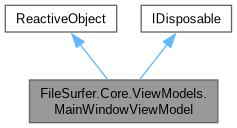
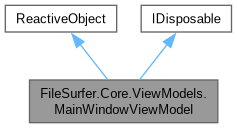
The MainWindowViewModel is the ViewModel for the main window of the application. More...
Public Member Functions | |
| MainWindowViewModel (string initialDir, LocalFileSystem localFs, IDialogService dialogService, Action< bool > setDarkMode) | |
| Initializes the main window view model with required services and the initial location. | |
| void | Dispose () |
| Saves the settings and disposes all owned resources. | |
Properties | |
| required SftpFileSystemFactory | SftpFsFactory [] |
| Gets or initializes the factory used to create SFTP-backed file system instances. | |
| required IClipboardManager | ClipboardManager [] |
| Gets or initializes the clipboard manager used for copy, cut, paste, and path-copy operations. | |
| SortInfo | SortInfo [get] |
| Gets the currently active sorting mode and direction. | |
| IEnumerable< LocationDisplay > | LocationsBack [get] |
| Represents locations behind the current one in location history. | |
| IEnumerable< LocationDisplay > | LocationsForward [get] |
| Represents locations ahead of the current one in location history. | |
| ObservableCollection< FileSystemEntryViewModel > | FileEntries = new() [get] |
| Holds FileSystemEntryViewModels displayed in the main window. | |
| ObservableCollection< FileSystemEntryViewModel > | SelectedFiles = new() [get] |
| Holds the currently selected FileSystemEntryViewModels. | |
| ObservableCollection< SideBarEntryViewModel > | QuickAccess = new() [get] |
| Holds FileSystemEntryViewModels displayed in Quick Access. | |
| ObservableCollection< SideBarEntryViewModel > | SpecialFolders = [] [get] |
| Holds the Special Folders FileSystemEntryViewModels. | |
| ObservableCollection< SideBarEntryViewModel > | Drives = [] [get] |
| Holds the Drives FileSystemEntryViewModels. | |
| ObservableCollection< SftpConnectionViewModel > | SftpConnectionsVms = [] [get] |
| Holds the parameters for SftpConnection. | |
| string | CurrentFsLabel [get, set] |
| Holds the label currently displayed in the PathBox. | |
| string | PathBoxText [get, set] |
| Holds the text currently displayed in the PathBox. | |
| string? | CurrentInfoMessage [get, set] |
| Gets or sets the status/info message displayed in the main window. | |
| string | SearchWaterMark [get, set] |
| Watermark that will be displayed in the Search bar. | |
| string | SelectionInfo [get, set] |
| Info about the current directory and selection. | |
| bool | Searching [get, set] |
| Indicates whether the app is searching currently. | |
| string | CurrentQuery [get, set] |
| Current searching query. | |
| ObservableCollection< string > | Branches = new() [get] |
| Contains a list of current repository's branches, displayed in the "Branches" combobox. | |
| string | CurrentBranch [get, set] |
| Currently selected branch in the "Branches" combobox. | |
| bool | IsVersionControlled [get, set] |
| Indicates whether the current directory is version controlled. | |
| RepoStateInfo | RepoStateInfo [get, set] |
| Holds the current commit repository state info. | |
| ReactiveCommand< Unit, Unit > | OpenEntriesCommand [get] |
| Gets the command that opens the currently selected entry or entries. | |
| ReactiveCommand< FileSystemEntryViewModel, Unit > | OpenEntryCommand [get] |
| Gets the command that opens a specific file-system entry. | |
| ReactiveCommand< SideBarEntryViewModel, Unit > | OpenSideBarEntryCommand [get] |
| Gets the command that navigates to a selected sidebar entry. | |
| ReactiveCommand< FileSystemEntryViewModel, Unit > | OpenAsCommand [get] |
| Gets the command that opens a file entry with a user-selected application. | |
| ReactiveCommand< string, Unit > | SetNewLocationCommand [get] |
| Gets the command that navigates to a user-specified location path. | |
| ReactiveCommand< Unit, Unit > | OpenInNotepadCommand [get] |
| Gets the command that opens the current context in the configured text editor. | |
| ReactiveCommand< FileSystemEntryViewModel?, Unit > | AddToQuickAccessCommand [get] |
| Gets the command that adds an entry to Quick Access. | |
| ReactiveCommand< Unit, Task > | AddToArchiveCommand [get] |
| Gets the command that archives the selected entries. | |
| ReactiveCommand< Unit, Task > | ExtractArchiveCommand [get] |
| Gets the command that extracts selected archive entries. | |
| ReactiveCommand< LocationDisplay?, Unit > | GoBackCommand [get] |
| Gets the command that navigates backward in location history. | |
| ReactiveCommand< LocationDisplay?, Unit > | GoForwardCommand [get] |
| Gets the command that navigates forward in location history. | |
| ReactiveCommand< Unit, Unit > | GoUpCommand [get] |
| Gets the command that navigates to the parent directory. | |
| ReactiveCommand< Unit, Unit > | ReloadCommand [get] |
| Gets the command that reloads the current location contents. | |
| ReactiveCommand< Unit, Unit > | OpenTerminalCommand [get] |
| Gets the command that opens a terminal rooted at the current location. | |
| ReactiveCommand< string, Task > | SearchCommand [get] |
| Gets the command that performs a recursive search for matching entry names. | |
| ReactiveCommand< Unit, Unit > | CancelSearchCommand [get] |
| Gets the command that cancels the active search and restores normal view state. | |
| ReactiveCommand< Unit, Unit > | NewFileCommand [get] |
| Gets the command that creates a new file. | |
| ReactiveCommand< Unit, Unit > | NewDirCommand [get] |
| Gets the command that creates a new directory. | |
| ReactiveCommand< string, Unit > | RenameCommand [get] |
| Gets the command that renames selected entries. | |
| ReactiveCommand< Unit, Unit > | CutCommand [get] |
| Gets the command that cuts selected entries to the clipboard. | |
| ReactiveCommand< Unit, Unit > | CopyCommand [get] |
| Gets the command that copies selected entries to the clipboard. | |
| ReactiveCommand< FileSystemEntryViewModel?, Task > | CopyPathCommand [get] |
| Gets the command that copies the selected entry path (or current path) to the clipboard. | |
| ReactiveCommand< FileSystemEntryViewModel, Unit > | CreateShortcutCommand [get] |
| Gets the command that creates a shortcut for the given entry. | |
| ReactiveCommand< FileSystemEntryViewModel, Task > | FlattenFolderCommand [get] |
| Gets the command that flattens a selected folder into the current directory. | |
| ReactiveCommand< FileSystemEntryViewModel, Unit > | ShowPropertiesCommand [get] |
| Gets the command that shows the properties dialog for a selected entry. | |
| ReactiveCommand< FileSystemEntryViewModel?, Task > | SyncDirCommand [get] |
| Gets the command that starts synchronization between local and remote directories. | |
| ReactiveCommand< Unit, Task > | PasteCommand [get] |
| Gets the command that pastes clipboard entries into the current location. | |
| ReactiveCommand< Unit, Task > | MoveToTrashCommand [get] |
| Gets the command that moves selected entries to trash. | |
| ReactiveCommand< Unit, Unit > | DeleteCommand [get] |
| Gets the command that permanently deletes selected entries. | |
| ReactiveCommand< SortBy, Unit > | SetSortByCommand [get] |
| Gets the command that changes the active sort key. | |
| ReactiveCommand< Unit, Unit > | UndoCommand [get] |
| Gets the command that undoes the most recent undoable file operation. | |
| ReactiveCommand< Unit, Unit > | RedoCommand [get] |
| Gets the command that redoes the most recently undone file operation. | |
| ReactiveCommand< Unit, Unit > | SelectAllCommand [get] |
| Gets the command that selects all visible entries. | |
| ReactiveCommand< Unit, Unit > | SelectNoneCommand [get] |
| Gets the command that clears the current selection. | |
| ReactiveCommand< Unit, Unit > | InvertSelectionCommand [get] |
| Gets the command that inverts the current selection. | |
| ReactiveCommand< SftpConnectionViewModel, Unit > | OpenSftpCommand [get] |
| Gets the command that opens a configured SFTP connection. | |
| ReactiveCommand< SftpConnectionViewModel, Unit > | CloseSftpCommand [get] |
| Gets the command that closes an opened SFTP connection. | |
| ReactiveCommand< FileSystemEntryViewModel?, Unit > | GitStageCommand [get] |
| Gets the command that stages a file for Git commit. | |
| ReactiveCommand< FileSystemEntryViewModel?, Unit > | GitUnstageCommand [get] |
| Gets the command that unstages a file from Git commit. | |
| ReactiveCommand< FileSystemEntryViewModel?, Unit > | GitRestoreCommand [get] |
| Gets the command that restores file changes from Git. | |
| ReactiveCommand< Unit, Unit > | GitStashCommand [get] |
| Gets the command that creates a Git stash from local changes. | |
| ReactiveCommand< Unit, Unit > | GitStashPopCommand [get] |
| Gets the command that reapplies and drops the latest Git stash. | |
| ReactiveCommand< Unit, Unit > | GitFetchCommand [get] |
| Gets the command that fetches remote Git changes. | |
| ReactiveCommand< Unit, Unit > | GitPullCommand [get] |
| Gets the command that pulls remote Git changes. | |
| ReactiveCommand< string, Unit > | GitCommitCommand [get] |
| Gets the command that creates a Git commit with the specified message. | |
| ReactiveCommand< Unit, Unit > | GitPushCommand [get] |
| Gets the command that pushes commits to the configured remote. | |
| bool | SelectionNotEmpty [get] |
| Gets whether at least one file-system entry is currently selected. | |
| bool | CanGoBack [get] |
| Gets whether backward navigation is currently possible. | |
| bool | CanGoForward [get] |
| Gets whether forward navigation is currently possible. | |
| bool | IsLocal [get] |
| Gets whether the currently displayed file system is local. | |
| bool | NotSearching [get] |
| Gets whether the view model is currently not in search mode. | |
Detailed Description
The MainWindowViewModel is the ViewModel for the main window of the application.
It serves as the intermediary between the View and the Model in the MVVM (Model-View-ViewModel) design pattern.
Handles data directly bound to the View.
Constructor & Destructor Documentation
◆ MainWindowViewModel()
|
inline |
Initializes the main window view model with required services and the initial location.
- Parameters
-
initialDir The initial local directory path to open when the window starts. localFs The local file-system integration used for browsing and file operations. dialogService The dialog service used to present input, confirmation, info, and progress dialogs. setDarkMode Callback that applies theme changes at the application level.
Member Function Documentation
◆ Dispose()
|
inline |
Saves the settings and disposes all owned resources.

Property Documentation
◆ AddToArchiveCommand
|
get |
Gets the command that archives the selected entries.
◆ AddToQuickAccessCommand
|
get |
Gets the command that adds an entry to Quick Access.
◆ Branches
|
get |
Contains a list of current repository's branches, displayed in the "Branches" combobox.
◆ CancelSearchCommand
|
get |
Gets the command that cancels the active search and restores normal view state.
◆ CanGoBack
|
get |
Gets whether backward navigation is currently possible.
◆ CanGoForward
|
get |
Gets whether forward navigation is currently possible.
◆ ClipboardManager
| required IClipboardManager FileSurfer.Core.ViewModels.MainWindowViewModel.ClipboardManager |
Gets or initializes the clipboard manager used for copy, cut, paste, and path-copy operations.
This is provided by the platform bootstrap during startup.
◆ CloseSftpCommand
|
get |
Gets the command that closes an opened SFTP connection.
◆ CopyCommand
|
get |
Gets the command that copies selected entries to the clipboard.
◆ CopyPathCommand
|
get |
Gets the command that copies the selected entry path (or current path) to the clipboard.
◆ CreateShortcutCommand
|
get |
Gets the command that creates a shortcut for the given entry.
◆ CurrentBranch
|
getset |
Currently selected branch in the "Branches" combobox.
◆ CurrentFsLabel
|
getset |
Holds the label currently displayed in the PathBox.
◆ CurrentInfoMessage
|
getset |
Gets or sets the status/info message displayed in the main window.
◆ CurrentQuery
|
getset |
Current searching query.
◆ CutCommand
|
get |
Gets the command that cuts selected entries to the clipboard.
◆ DeleteCommand
|
get |
Gets the command that permanently deletes selected entries.
◆ Drives
|
get |
Holds the Drives FileSystemEntryViewModels.
◆ ExtractArchiveCommand
|
get |
Gets the command that extracts selected archive entries.
◆ FileEntries
|
get |
Holds FileSystemEntryViewModels displayed in the main window.
◆ FlattenFolderCommand
|
get |
Gets the command that flattens a selected folder into the current directory.
◆ GitCommitCommand
|
get |
Gets the command that creates a Git commit with the specified message.
◆ GitFetchCommand
|
get |
Gets the command that fetches remote Git changes.
◆ GitPullCommand
|
get |
Gets the command that pulls remote Git changes.
◆ GitPushCommand
|
get |
Gets the command that pushes commits to the configured remote.
◆ GitRestoreCommand
|
get |
Gets the command that restores file changes from Git.
◆ GitStageCommand
|
get |
Gets the command that stages a file for Git commit.
◆ GitStashCommand
|
get |
Gets the command that creates a Git stash from local changes.
◆ GitStashPopCommand
|
get |
Gets the command that reapplies and drops the latest Git stash.
◆ GitUnstageCommand
|
get |
Gets the command that unstages a file from Git commit.
◆ GoBackCommand
|
get |
Gets the command that navigates backward in location history.
◆ GoForwardCommand
|
get |
Gets the command that navigates forward in location history.
◆ GoUpCommand
|
get |
Gets the command that navigates to the parent directory.
◆ InvertSelectionCommand
|
get |
Gets the command that inverts the current selection.
◆ IsLocal
|
get |
Gets whether the currently displayed file system is local.
◆ IsVersionControlled
|
getset |
Indicates whether the current directory is version controlled.
◆ LocationsBack
|
get |
Represents locations behind the current one in location history.
◆ LocationsForward
|
get |
Represents locations ahead of the current one in location history.
◆ MoveToTrashCommand
|
get |
Gets the command that moves selected entries to trash.
◆ NewDirCommand
|
get |
Gets the command that creates a new directory.
◆ NewFileCommand
|
get |
Gets the command that creates a new file.
◆ NotSearching
|
get |
Gets whether the view model is currently not in search mode.
◆ OpenAsCommand
|
get |
Gets the command that opens a file entry with a user-selected application.
◆ OpenEntriesCommand
|
get |
Gets the command that opens the currently selected entry or entries.
◆ OpenEntryCommand
|
get |
Gets the command that opens a specific file-system entry.
◆ OpenInNotepadCommand
|
get |
Gets the command that opens the current context in the configured text editor.
◆ OpenSftpCommand
|
get |
Gets the command that opens a configured SFTP connection.
◆ OpenSideBarEntryCommand
|
get |
Gets the command that navigates to a selected sidebar entry.
◆ OpenTerminalCommand
|
get |
Gets the command that opens a terminal rooted at the current location.
◆ PasteCommand
|
get |
Gets the command that pastes clipboard entries into the current location.
◆ PathBoxText
|
getset |
Holds the text currently displayed in the PathBox.
◆ QuickAccess
|
get |
Holds FileSystemEntryViewModels displayed in Quick Access.
◆ RedoCommand
|
get |
Gets the command that redoes the most recently undone file operation.
◆ ReloadCommand
|
get |
Gets the command that reloads the current location contents.
◆ RenameCommand
|
get |
Gets the command that renames selected entries.
◆ RepoStateInfo
|
getset |
Holds the current commit repository state info.
◆ SearchCommand
|
get |
Gets the command that performs a recursive search for matching entry names.
◆ Searching
|
getset |
Indicates whether the app is searching currently.
◆ SearchWaterMark
|
getset |
Watermark that will be displayed in the Search bar.
◆ SelectAllCommand
|
get |
Gets the command that selects all visible entries.
◆ SelectedFiles
|
get |
Holds the currently selected FileSystemEntryViewModels.
◆ SelectionInfo
|
getset |
Info about the current directory and selection.
Will be displayed in the Status bar.
◆ SelectionNotEmpty
|
get |
Gets whether at least one file-system entry is currently selected.
◆ SelectNoneCommand
|
get |
Gets the command that clears the current selection.
◆ SetNewLocationCommand
|
get |
Gets the command that navigates to a user-specified location path.
◆ SetSortByCommand
|
get |
Gets the command that changes the active sort key.
◆ SftpConnectionsVms
|
get |
Holds the parameters for SftpConnection.
◆ SftpFsFactory
| required SftpFileSystemFactory FileSurfer.Core.ViewModels.MainWindowViewModel.SftpFsFactory |
Gets or initializes the factory used to create SFTP-backed file system instances.
This is provided by the platform bootstrap during startup.
◆ ShowPropertiesCommand
|
get |
Gets the command that shows the properties dialog for a selected entry.
◆ SortInfo
|
get |
Gets the currently active sorting mode and direction.
◆ SpecialFolders
|
get |
Holds the Special Folders FileSystemEntryViewModels.
◆ SyncDirCommand
|
get |
Gets the command that starts synchronization between local and remote directories.
◆ UndoCommand
|
get |
Gets the command that undoes the most recent undoable file operation.
The documentation for this class was generated from the following files:
- /home/janecea/Documents/CODE/PROJECTS/FileSurfer/src/FileSurfer.Core/ViewModels/MainWindowViewModel.cs
- /home/janecea/Documents/CODE/PROJECTS/FileSurfer/src/FileSurfer.Core/ViewModels/MWVMCommandImpl.cs